
How Simple Monitor Mounts Can Empower (And Protect) Dental Staff
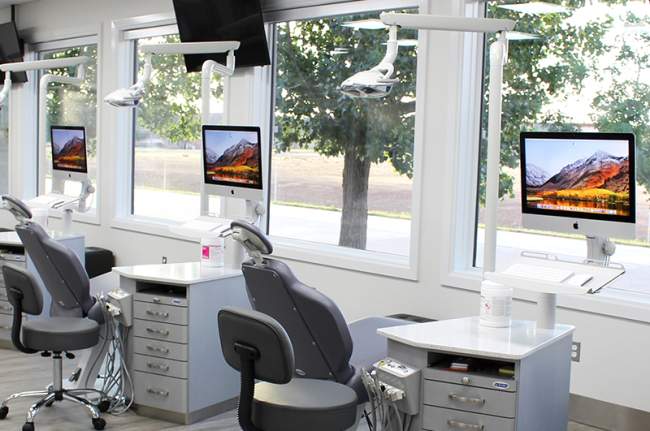
In the high-precision environment of dentistry, workplace injuries are rarely just about one wrong move. More often, they accumulate slowly over time through the repetitive leaning, twisting, and fine-motor work required to treat patients. Fortunately, there are specific precautions dental professionals can take to prevent these injuries and ensure a long, healthy career.
One of these precautions is staying educated about ergonomic safety, a foundational component of every successful practice. Given the sustained focus required in dental care, clinicians often spend extended periods in fixed, awkward positions. This makes the environment especially prone to musculoskeletal disorders (MSDs). Proactively addressing ergonomics protects practitioners’ health and leads to greater productivity, improved patient care, and a more resilient dental team.
Musculoskeletal disorders (MSDs) are a leading cause of occupational disability. Within dentistry, MSDs refer to soft-tissue injuries caused by exposure to repetitive movement, force, vibration, or sustained awkward postures. These injuries commonly affect the neck, shoulders, back, wrists, and hands.
Over time, unaddressed MSDs result in pain, reduced work capacity, frequent absences, and even premature exit from the profession. The consequences reach beyond physical pain, impacting mental health, morale, and overall productivity in the dental setting.
Ergonomics is the science of designing workplace conditions to suit the abilities and limitations of workers. In dentistry, ergonomics focuses on the layout of the operatory, the selection of dental tools, and the integration of ergonomic computer workstations. While hand instruments are often designed for grip comfort, digital workstations must also be tailored for neutral joint alignment. Utilizing ergonomic keyboards reduces wrist strain, while properly positioned monitor stands and delivery systems lower the need for bending or reaching.
While the goal of injury prevention is shared, the ergonomic needs of clinical staff differ significantly from those of the administrative team.
Dental Hygienists: Often considered the "endurance athletes" of the practice, hygienists face unique risks due to the high frequency of scaling and polishing tasks. They spend hours hovering over patients, often maintaining static, leaning postures that strain the neck and upper back. Their workspace is dynamic; they need to maneuver around the patient chair in tight quarters without twisting their spine to reach instruments or view charts. For them, equipment must be mobile and flexible, allowing them to bring data and tools to the neutral working zone rather than reaching for them.
Front Office Staff: In contrast, receptionists and scheduling coordinators face the risks of a sedentary role. Their primary challenge is prolonged static loading—sitting in the same position for hours while performing repetitive keyboard and mouse work. Without a dedicated ergonomic workstation setup, this lack of movement can lead to lower back compression, wrist strain from poor typing angles, and neck pain from monitors placed too low. Their needs center on adjustability and the ability to alternate between sitting and standing to break the static cycle.
Several risk factors increase the likelihood of injury across the practice, including excessive grip force, insufficient recovery time, and poor computer workstation design. Injury prevention requires a multi-faceted approach:
Warming Up: Regular stretching routines prepare the musculoskeletal system for the day’s demands. Static and dynamic stretches can increase flexibility and restore range of motion.
Microbreaks: Taking short pauses every 20 to 30 minutes to adjust posture or stand up provides essential relief to joints and interrupts static loading.
Hydration: Staying well-hydrated keeps muscles and joints supple, reducing cramping and aiding physical resilience during long shifts.
To further reduce risks, staff should look for a medical-grade monitor mount engineered to promote proper body mechanics. These tools allow users to easily position technology for maximum comfort rather than contorting their bodies to fit the equipment.
Getting any job done safely depends on using the best tools available. Whether clinical or administrative, the "one-size-fits-all" approach to workstations is a major contributor to injury.
For front office staff, the priority is neutral joint alignment. Upgrading to single monitor arms or adjustable stands allows the screen to be raised to eye level, preventing the "forward head" posture that causes neck strain. Combining this with sit-stand desks enables staff to seamlessly transition positions, keeping them fresher and more alert.
For hygienists and dentists, the priority is reach and range. A static computer in the corner of the operatory forces dangerous twisting motions. Instead, upgrading to an adjustable mounting arm allows the monitor and keyboard to be pulled directly into the clinician's field of view. This supports a "heads-up" workflow where charting and x-ray review can happen without breaking ergonomic form.
Built using ICW advanced ergonomic technology, TouchPoint Medical’s AccessMount™ Mounting Systems offer the articulation, reach, and stability required for modern dental teams. Instead of staff contorting themselves to see a screen, a highly adaptable mounting arm bends, tilts, and swivels to the user, ensuring the team is always comfortable.
With features like fully adjustable arms, height controls, and easy repositioning, AccessMounts let clinicians set devices at the ideal angle for each task. This flexibility supports neutral postures, minimizing forward head tilt and shoulder elevation—key contributors to MSDs.
The system’s modular range promotes muscle variation and reduces lower back compression. For example, a monitor wall mount arm allows hygienists to keep their elbows close to the body and eyes forward, reducing the strain of repetitive reach and minimizing the likelihood of carpal tunnel or rotator cuff issues. Whether you need monitor stands for a reception desk or a wall-mounted solution for an operatory, these customizable designs support preventive ergonomic habits.
Ready to protect your team’s health and improve practice efficiency? Explore TouchPoint Medical’s AccessMount™ solutions today to find the perfect ergonomic fit for your dental environment.
