Guide to Choosing the Best Mounting Arm for Any Hospital Department
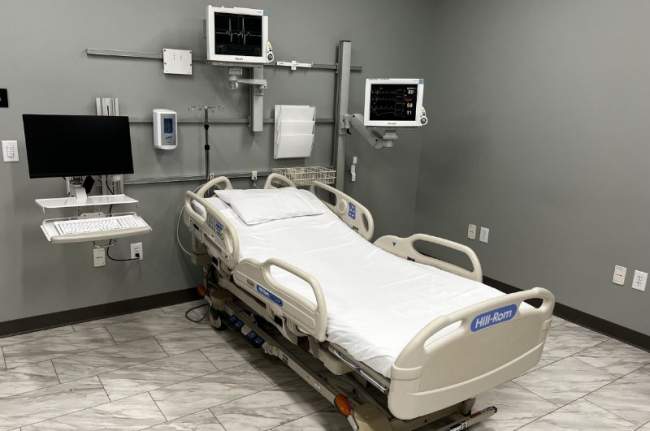
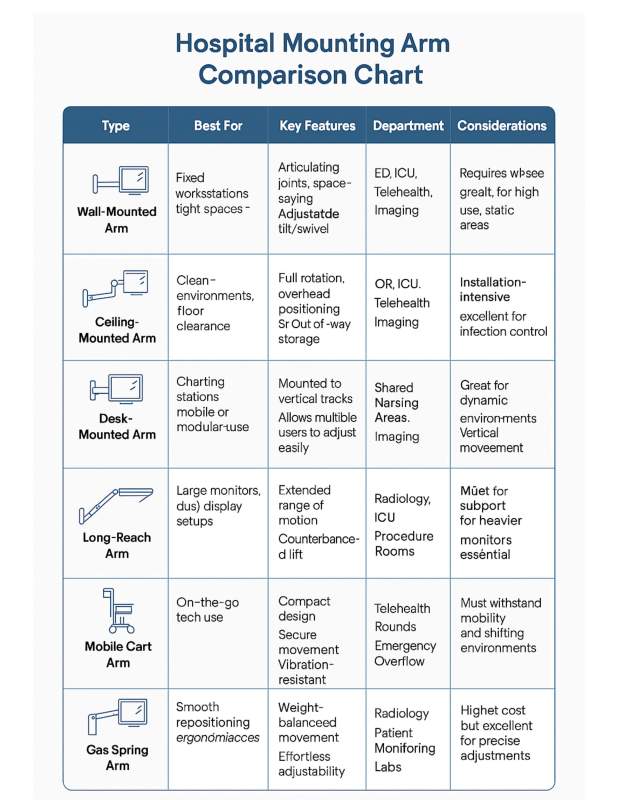
In hospitals, where space is limited and efficiency is essential, the right mounting solution can make a significant difference. When setting up a busy emergency department or ICU workstation, it is critical to choose the right mounting arm. This applies to each monitor and wall-mounted TV. It helps support clinical workflows, improve ergonomics, and make the best use of space.
Here’s a guide to help medical equipment planners choose the right TouchPoint Medical mounting arm for different hospital departments.
What to prioritize:
• Fast access to equipment
• Space-saving, wall-mounted options
• Smooth articulation and cable management
Recommended solution:
A wall-mounted articulating arm with quick-release features and easy adjustability. Emergency staff need fast, intuitive access to monitors and peripherals, often in tight spaces. Select arms with slim profiles that staff can swing out of the way when not in use. Check out the AccessMount 180 ICW.
What to prioritize:
• Stability under constant use
• Adjustable viewing angles for multiple users
• Secure cable routing
Recommended solution:
A heavy-duty, height-adjustable arm that can support larger monitors or dual-screen setups. Choose models with secure tilt and swivel adjustments to accommodate clinicians working long hours and across different shifts. Consider the AccessMount 5216 ICW.
What to prioritize:
• Minimalist design for easy sterilization
• Exact positioning for monitors or cameras
• Ceiling or wall-mounted options
Recommended solution:
A ceiling-mounted arm with full articulation and medical-grade materials. ORs demand hygienic surfaces and flexible positioning to accommodate surgical workflows. Smooth finishes and concealed cable routing help meet infection prevention standards. The AccessMount Titan Elite is an ergonomically superior mount that would work well in the operating room.
What to prioritize:
• Comfortable viewing for both staff and patients
• Quiet operation and clean aesthetics
• Easy-to-clean surfaces
Recommended solution:
An adjustable wall-mounted arm with extended reach. This design allows the user to easily reposition the monitor or device for patient interaction or nurse charting. A model with a soft-close mechanism and low visual profile adds comfort without clutter. With the AccessMount 5220 ICW, you get industry leading reach that stows in a compact profile.

What to prioritize:
• Precise monitor positioning
• Heavy monitor support
• Long reach and counterbalance options
Recommended solution:
A gas-spring monitor arm or long-reach arm that can accommodate high-resolution displays. Radiologists need accurate positioning and minimal movement when interpreting scans, so high-stability, low-drift arms are a must. Try the AccessMount Overhead arm for exceptional reach and range of motion with precise monitor positioning.
What to prioritize:
• Compact footprint
• Smooth movement
• Durability under high use
Recommended solution:
A desk-mounted or wall track-mounted arm that allows shared use between multiple staff members. Look for options with friction-based adjustments and locking pivots to maintain screen placement during busy shifts. Check out the AccessMount 550 ICW as a solution for your nurse stations.
What to prioritize:
• Lightweight, durable construction
• Stable monitor mounting
• Easy height adjustment
Recommended solution:
A compact monitor arm designed for multiple surfaces including walls, desks and carts with vertical adjustability and secure mounting. It should handle vibration from movement and stay aligned during transport between rooms or buildings. The AccessMount 180 ICW is our most popular mount for a reason. It pairs nicely with our proCARE procedure carts and mount onto nearly any anesthesia cart. The AccessMount 180 ICW is also the perfect sit-stand workstation that mounts to just about any surface in a narrow footprint of just 3″ and stows tightly against the wall.
Weight Capacity
Always match the arm to your monitor’s weight and size. Overloading a mounting arm can lead to equipment failure, posing risks to both staff and patients. Make sure the arm you choose matches the requirements of the monitors in different departments.
VESA Compatibility
VESA stands for Video Electronics Standards Association. It refers to the standard sizes and hole patterns on the back of monitors and TVs for mounting. If a mounting arm is not VESA compatible, it might not fit the monitor well, creating potential safety issues. Ensuring VESA compatibility helps maintain a safe and efficient environment, allowing for easy installation and interchangeability of devices across different departments.
Cable Management
Another important factor to consider is cable management. A good TV mount should keep cables organized and out of the way. This reduces clutter and lowers the risk of tripping. This not only contributes to a safer environment but also makes cleaning and maintenance easier.
Ease of Cleaning
Surfaces should be easy to wipe down and disinfect regularly to help prevent the spread of pathogens. Adding arms and equipment designed for quick cleaning helps improve overall efficiency. Easy-to-clean mounting arms allow healthcare workers to focus on patient care instead of maintenance.
Installation Flexibility
Look for arms that work with wall tracks, ceilings, counters, or mobile carts as needed. This adaptability ensures staff can optimize their space and equipment layout according to specific departmental needs. Ultimately, flexible installation contributes to better patient care and operational effectiveness across all hospital departments.
A well-chosen mounting arm supports more than just your technology—it supports the people who use it. The right solution improves clinical efficiency, protects equipment, and helps staff focus on delivering excellent care. Planners who select department-specific mounting arms ensure their hospital environments support optimal performance, flexibility, and safety.
Need help choosing the right mounting solution for your facility?
Reach out to our team at TouchPoint Medical. We’ll help you assess your entire environment and recommend solutions tailored to your clinical workflows.